

What if the most important part of arranging your guest’s airport pickup isn’t choosing a car, but making sure every detail lines up? Knowing how to schedule airport pickup for a guest starts with accurate flight and passenger information, then continues with a vehicle that fits the group and clear directions for meeting the driver.
A missing flight detail, an itinerary change, or vague pickup instructions can leave your guest unsure what to do after landing. Start with the guest’s latest itinerary, then gather their arrival date, airline, flight number, passenger count, luggage needs, and destination before booking.
This guide walks through the decisions that make a pickup plan easier to follow: which trip details to collect, how to choose between a one-way transfer, round-trip transfer, or hourly rental, and how to match a sedan, SUV, or Mercedes Sprinter van to the group. You’ll also learn what to share with your guest and how to coordinate if the itinerary changes. Airport Transfer Atlanta offers point-to-point transfers and chauffeur-driven hourly rentals, giving you service formats to fit different trip plans.
Key Takeaways
- For how to schedule airport pickup for a guest, gather the traveler’s name, contact details, airline, flight number, and arrival date before booking.
- Match the service format to the itinerary: a point-to-point transfer suits a direct trip, while hourly rental can fit a schedule with multiple stops.
- Choose a sedan, SUV, or van based on the passenger count and luggage needs.
- Enter the guest as the traveler and your own details as the booking contact when appropriate, then review all trip information before submitting.
- Share the booking reference and pickup instructions with your guest, using the meeting details provided for that specific booking.
How to Schedule Airport Pickup for a Guest: Start with the Trip Details
When you arrange transportation for someone else, you make the booking, but your guest is the person arriving and following the pickup plan. Collect the details from their latest itinerary rather than relying on memory or an older message. Confirm the name, flight, arrival date, and destination before you choose a service or vehicle.
Use this checklist to get the booking information together:
- Guest name: Enter the traveler’s full name as shown on their itinerary.
- Contact details: Get a phone number or another agreed way to reach the guest after landing.
- Flight details: Record the airline, flight number, scheduled arrival date, and arrival time.
- Airport information: Confirm the arrival airport and the terminal shown on the current itinerary.
- Group and luggage: Ask how many people are traveling and what luggage they expect to bring.
- Trip destination: Get the complete drop-off address, including any building, entrance, or other details needed to identify the destination.
An airport brings together terminals, passenger services, and onward travel options. This overview of airport ground transportation provides context for the setting where your guest will continue their trip. For the actual reservation, use the guest’s current itinerary and the pickup instructions associated with the booking.
What information do you need to book airport pickup for someone else?
Collect the guest’s full name and a contact method they can access after landing. Then record the airline, flight number, scheduled arrival date, and arrival time. Ask how many passengers are traveling, how much luggage they expect, and where they need to go after pickup. These details help you choose a service format and vehicle category that fit the trip. They also help prevent practical errors, such as entering the wrong flight or selecting a vehicle without considering the bags.
How should you confirm the guest’s arrival details?
Compare each booking field with the guest’s latest itinerary before submitting. Check the airport, terminal, flight number, and arrival date. Make sure the pickup and destination details match the transportation plan. Ask the guest to tell you promptly if any part of the itinerary changes, and agree on how you’ll pass along updates. Accurate information keeps the reservation aligned with the trip, but don’t assume that flight monitoring or automatic delay handling is included.
For a practical approach to how to schedule airport pickup for a guest, treat the current itinerary as your reference and involve the guest in confirming it. Once the details are accurate, you can choose the service format and vehicle with fewer assumptions.
Choose the Right Airport Pickup Service and Vehicle for the Guest
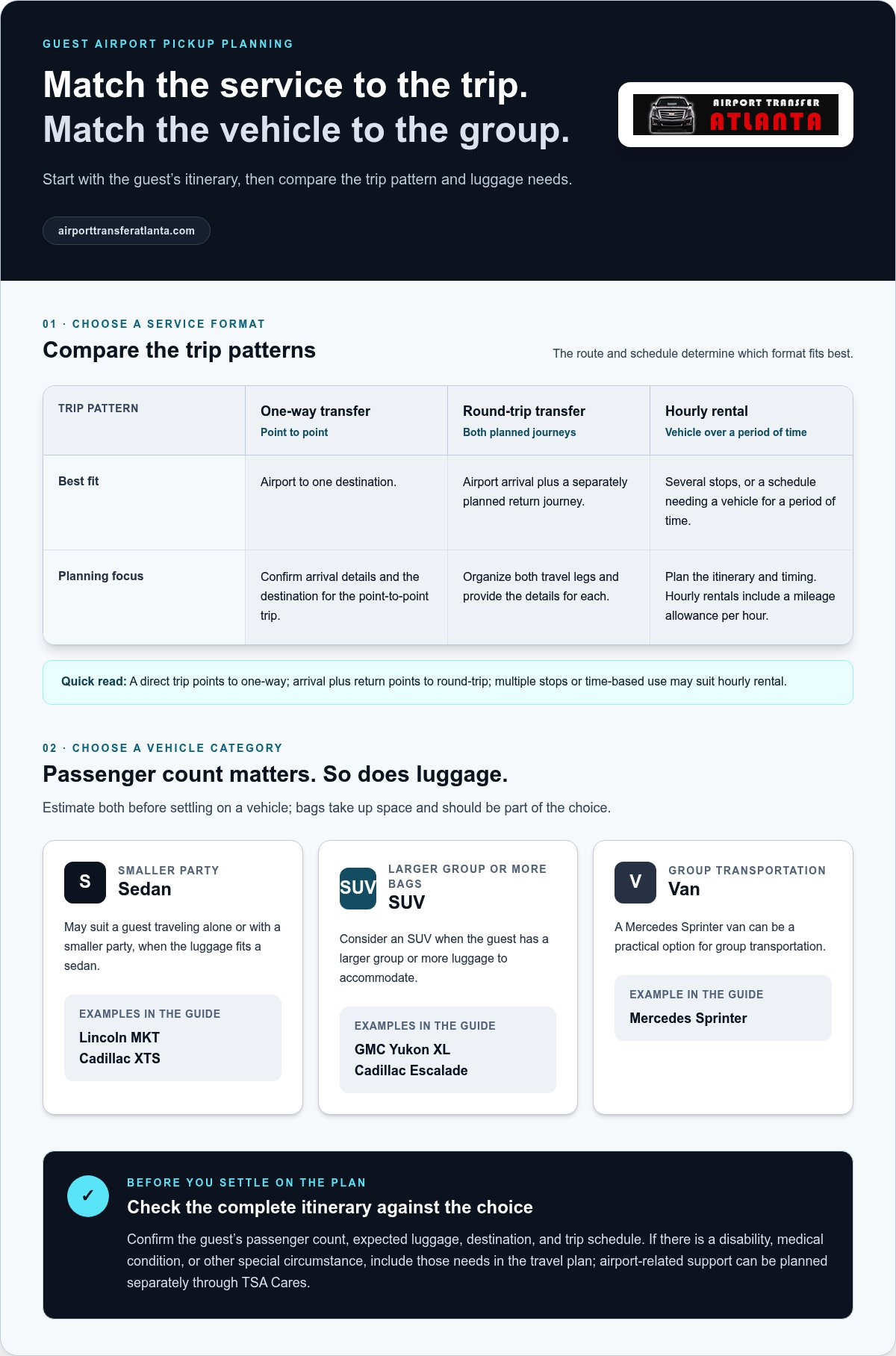
Choose a service based on what the guest needs after landing, not just the airport-to-destination route. A single trip to one destination may call for a one-way transfer. If you’re arranging both arrival and return transportation, a round-trip transfer can cover the planned journeys. A schedule with several stops or a vehicle needed over a period of time may suit an hourly rental. Once you’ve matched the service to the itinerary, choose a vehicle based on the passenger count and luggage.
| Trip pattern | Suitable service format | Planning consideration |
|---|---|---|
| Airport to one destination | One-way airport transfer | Confirm the arrival details and destination for the point-to-point trip. |
| Airport arrival and a separately planned return journey | Round-trip transfer | Organize both travel legs and provide the details for each. |
| Several stops or a schedule requiring a vehicle over a period of time | Hourly rental | Plan the itinerary and timing; hourly rentals include a mileage allowance per hour. |
When does a one-way, round-trip, or hourly pickup make sense?
A one-way service fits a single airport-to-destination journey. Choose a round-trip format when you’re arranging transportation for both the guest’s arrival and a later return trip. Hourly rental suits an itinerary that needs a chauffeur-driven vehicle for a period of time, such as an arrival followed by multiple planned stops. Airport Transfer Atlanta offers one-way transfers and hourly limo rentals, as well as round-trip transportation. For more context on professional chauffeured transportation, read this professional airport limo service guide.
How do you match a vehicle to passengers and luggage?
Start with the passenger count, then estimate luggage before settling on a vehicle. A Lincoln MKT or Cadillac XTS sedan may suit a guest traveling alone or with a smaller party and luggage that fits a sedan. For a larger group or more bags, consider a GMC Yukon XL or Cadillac Escalade SUV. A Mercedes Sprinter van can be a practical option for group transportation. Don’t choose by passenger count alone: luggage takes up space, so include it in the decision.
If the guest has a disability, medical condition, or other special circumstance, include their needs in the travel plan. The TSA Passenger Support page describes assistance available through TSA Cares. This can help you plan airport-related support separately from the ground transportation booking.
For a group itinerary, review this chauffeur-driven Sprinter rental guide. Choosing the service format and vehicle together gives you a clear plan to carry into the reservation.
Book the Guest’s Airport Pickup with Complete, Accurate Instructions
Once you’ve confirmed the itinerary and selected a vehicle category, enter the reservation in a consistent order. Keep the organizer’s role separate from the guest’s: you can manage the booking while identifying the guest as the person who will ride. This helps keep traveler details and booking-contact details attached to the right people.
- Select the service. Choose a one-way or round-trip transfer, or an hourly rental, based on the guest’s full itinerary.
- Enter the trip details. Add the travel date, scheduled arrival time, flight information, pickup point, and destination or planned itinerary.
- Provide passenger information. Enter the guest’s name and contact details, plus the passenger count and luggage information.
- Review the booking. Compare the trip details and selected vehicle category with the guest’s latest itinerary and needs.
- Submit the reservation. Save the booking reference and any service contact information provided with the booking.
If the booking form separates traveler and organizer details, list the guest as the traveler and use your own information as the booking contact when appropriate. That way, the reservation identifies who will ride and how to reach the organizer. This university airport transportation resource offers an example of transportation coordination for a defined community.
Which booking details should you review before submitting?
Read the completed reservation from your guest’s point of view. Verify the pickup and destination addresses, then check the travel date, scheduled arrival time, airline, and flight number. Confirm that the passenger count and luggage estimate fit the selected vehicle category. Look for common entry mistakes, including a transposed date, incomplete address, wrong terminal, or mismatch between the group’s needs and the vehicle. Correcting these details before submitting helps keep the reservation consistent with the itinerary.
How can you keep the organizer and guest coordinated?
Send the guest a written summary before travel. Include the booked service, trip details, pickup plan, booking reference, and any service contact information provided with the reservation. If someone else is helping coordinate the arrival, share the essential details with them too. Agree on how you and the guest will communicate itinerary changes through the applicable booking channel, so you’re both working from the same information.
Clear instructions matter as much as accurate form entries. Keep the summary concise and copy the pickup directions supplied for that booking rather than adding assumptions. Airport Transfer Atlanta provides one-way airport transfers, round-trip transfers, and hourly chauffeur-driven rentals. Review the airport pickup service options and organize the reservation around the guest’s confirmed itinerary.
Prepare Clear Airport Pickup Instructions and a Backup Communication Plan
A reservation is easier to use when your guest knows what to do after landing. Send a short written summary before travel, while there’s time to read it and ask questions. Include the booked service, travel date, booking reference, and the pickup plan provided with the reservation. Keep a copy of the same information so you can refer to it if plans change.
Airport meeting procedures vary, so follow the instructions supplied for this specific booking. Don’t assume the driver will meet the guest inside the terminal or at a particular curb. Make sure you and the guest have a working way to communicate on the day of travel. If the reservation includes service contact information, share it with the guest.
What should you tell a guest before their flight?
Make the message easy to scan. State the service and travel date, then copy the pickup directions as provided. Tell the guest to keep the booking reference and relevant contact details accessible after landing. Avoid adding directions based on what you expect airport procedures to be. If the guest is unfamiliar with the airport, concise, booking-specific instructions are more useful than a long message built on assumptions.
- Service: The transportation format booked.
- Trip: The travel date and booking reference.
- Pickup: The exact meeting instructions supplied for the reservation.
- Contacts: A working way to reach you and any service contact information provided.
What should happen if the flight or arrival plan changes?
Agree on a communication plan before departure. Ask the guest to notify you as soon as they learn of a flight or itinerary change. Then pass relevant updates through the contact route associated with the booking. Keep the message factual: provide the updated flight or arrival information and any revised plan. Don’t assume the service is monitoring the flight or will automatically adjust the pickup time.
This is a practical part of how to schedule airport pickup for a guest: decide who will communicate changes and how. A brief reply confirming you received an update can prevent crossed wires. If the original meeting plan no longer fits, use the applicable booking contact route for guidance instead of sending the guest to an unverified pickup point.
For a professionally organized transfer, review professional airport transfer options and choose an arrangement that fits the guest’s itinerary.
Complete the Guest Pickup Plan with a Final Coordination Checklist
A final review turns a reservation into a usable arrival plan. Save the trip details and pickup instructions in one place, then send the guest a summary they can easily find. When both of you have the same information, it’s simpler to coordinate the arrival and pass along changes.
What is the final airport pickup checklist for an organizer?
Before travel, use this checklist to confirm the plan:
- Booking reference: Save it somewhere you and the guest can access.
- Itinerary: Confirm the current travel date, arrival time, flight details, airport, and destination.
- Selected service: Check that the transfer or hourly rental fits the guest’s itinerary.
- Passenger information: Review the traveler’s contact details, passenger count, luggage estimate, and vehicle category.
- Communication plan: Agree on how the guest will reach you and how you’ll pass along updates through the applicable booking contact route.
- Pickup summary: Send the guest the instructions provided for the specific reservation.
Keep the message concise and easy to retrieve. The guest should be able to find the booking reference, service details, and pickup directions without searching through a long conversation. If the itinerary changes, share the update using the communication method you agreed on.
How can a professional transfer simplify guest transportation?
A prearranged chauffeur-driven transfer gives you a defined service format and itinerary to communicate. A one-way or round-trip transfer suits planned point-to-point travel, while an hourly rental can fit a schedule that needs a vehicle and chauffeur for a period of time. Airport Transfer Atlanta offers these transfer formats, along with hourly luxury vehicle rentals. Available vehicle categories include Lincoln MKT and Cadillac XTS sedans, GMC Yukon XL and Cadillac Escalade SUVs, and Mercedes Sprinter vans. Match the vehicle to the group and luggage instead of assuming capacity based on passenger count alone.
For additional guidance on professional transportation, see this professional guide to limo companies. Knowing how to schedule airport pickup for a guest comes down to aligning the reservation, vehicle, itinerary, and handoff instructions, then keeping both parties informed.
Arrange a professional airport pickup to organize your guest’s transportation around their trip.
Put the Pickup Plan in Place
A smooth guest arrival starts with current flight and passenger details, a service and vehicle suited to the itinerary, and pickup instructions the traveler can access before landing. Reviewing the reservation and agreeing on how to share updates helps keep the organizer and guest aligned.
If you’re deciding how to schedule airport pickup for a guest, match the service to the journey. One-way and round-trip point-to-point airport transfers suit planned trips between locations, while hourly rental fits an itinerary that needs a chauffeur-driven vehicle for a period of time. Point-to-point transfers use flat-rate pricing based on the vehicle and distance. Hourly rentals are priced by time and include a mileage allowance per hour, with additional costs for mileage beyond the allowance. Sedans, SUVs, and Mercedes Sprinter vans give you vehicle categories to consider based on the group and luggage.
Set the details in place, share the booking information, and give your guest a clear plan to follow. Arrange a professional airport pickup with a service format that fits the trip. With the key logistics organized, you and your guest can refer to the same transportation plan.
Frequently Asked Questions
What information do I need to schedule airport pickup for a guest?
Gather the guest’s full name, contact details, airline, flight number, scheduled arrival date and time, arrival airport, and terminal information shown on the itinerary. Also record the passenger count and expected luggage, along with the pickup and destination details. You’ll need to select a service format that fits the trip. Checking the details against the guest’s latest itinerary helps you enter accurate information and choose a vehicle category that suits the group.
Can I book an airport pickup for someone else?
Yes. You can arrange transportation as the organizer while listing your guest as the traveler. If the booking form separates traveler and booking-contact fields, enter the guest’s passenger information and use your own contact details for the reservation when appropriate. Share the booking reference and pickup instructions with the guest before travel. This gives both of you the information needed to coordinate the arrival.
How far in advance should I schedule airport pickup for a guest?
There isn’t a universal lead time that suits every trip. Arrange the pickup once the guest’s itinerary and transportation needs are clear, so you can submit accurate flight, passenger, and destination details. Planning ahead also gives you time to review the reservation and send the pickup instructions before the travel date. If the itinerary is still changing, confirm the latest details with the guest before you enter them.
What happens if my guest’s flight is delayed or changed?
Ask your guest to tell you as soon as they learn about a change. Share updated flight or arrival details through the contact route associated with the booking, and pass along any instructions you receive. Don’t assume the pickup service tracks flights or automatically adjusts the scheduled time. Agreeing on a communication method before travel makes it easier to relay updates.
How do I choose the right vehicle for my guest and their luggage?
Use the passenger count and luggage estimate to select a vehicle category that fits the itinerary. A Lincoln MKT or Cadillac XTS sedan may suit a guest with a smaller party and luggage appropriate for a sedan. Consider a GMC Yukon XL or Cadillac Escalade SUV for different group or luggage needs, or a Mercedes Sprinter van for group transportation. Avoid relying on passenger count alone, because luggage also affects the fit.
Should I book a one-way transfer, a round trip, or hourly service?
Choose a one-way transfer for a single airport-to-destination journey. A round-trip transfer suits plans that include both arrival and return transportation. Hourly service may fit an itinerary that needs a chauffeur-driven vehicle over a period of time, such as a schedule with planned stops. Consider the full trip before booking. Point-to-point transfers and hourly rentals are different formats, so select the one that matches the guest’s transportation plan.
What pickup instructions should I send to an arriving guest?
Send a concise written summary with the service description, travel date, booking reference, and pickup directions supplied for that specific reservation. Include any service contact information provided and agree on a working way for you and the guest to communicate. Airport meeting procedures vary, so don’t guess the terminal, curb, or meeting point. Give the guest the instructions before departure, when there’s time to review them.
Can I arrange airport pickup if I do not know the guest’s final arrival time?
You’ll need the scheduled arrival time and current flight details to enter an accurate itinerary-based booking. If the guest’s timing is still unknown, ask them to share the latest itinerary before submitting those details. If the flight information changes after booking, pass the update through the contact route associated with the reservation. Don’t assume an unknown arrival time will be tracked or adjusted automatically.


