

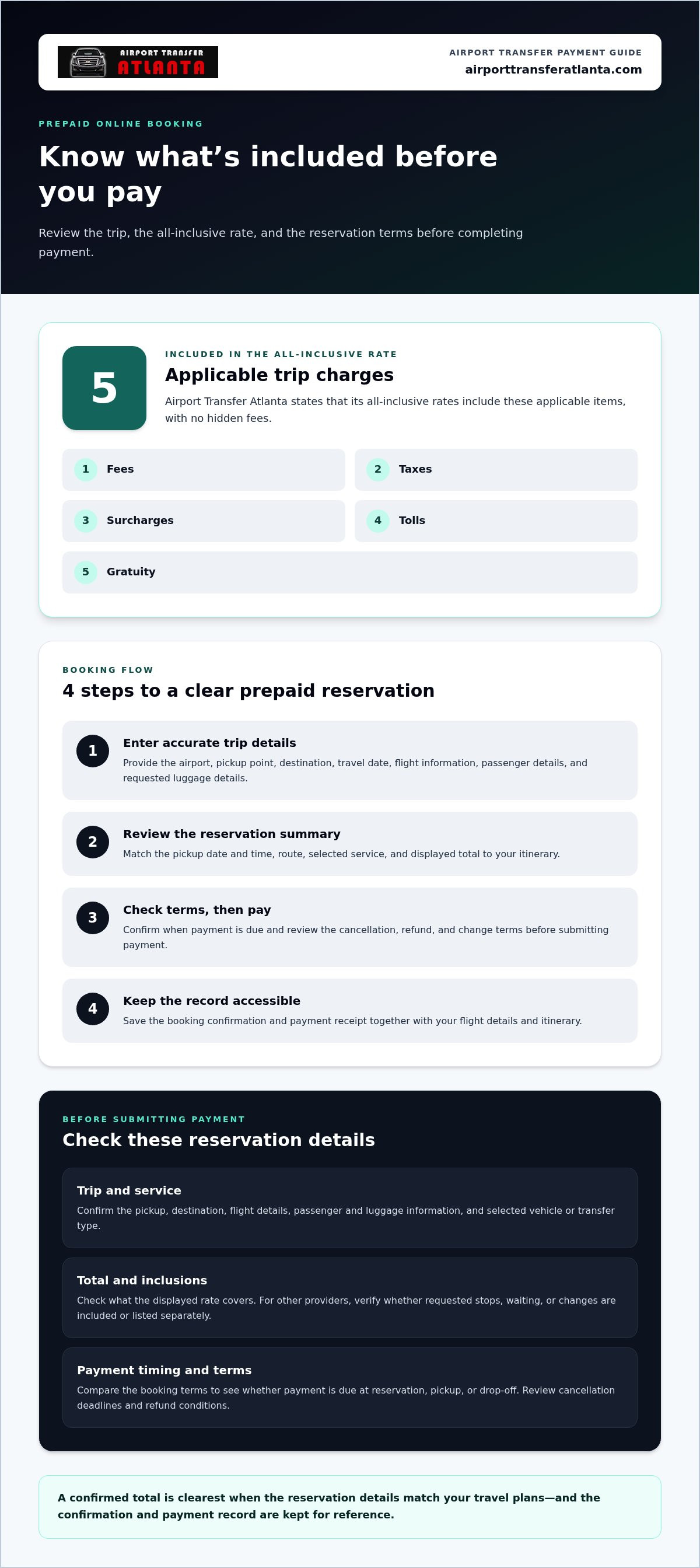
Paying before pickup is a straightforward way to settle your airport transfer in advance: book online and pay during the reservation. Before completing the booking, review the trip details and the all-inclusive rate. Airport Transfer Atlanta’s All-inclusive rates include applicable fees, taxes, surcharges, tolls, and gratuity, with no hidden fees.
A confirmed total can make travel planning easier, but the payment screen still deserves a careful review. This guide explains how prepaid online booking works, what to look for before paying, and which possible extras may appear separately. It also covers how payment timing differs between an advance booking and arrangements settled around pickup, so you can choose a process that fits your itinerary. Keep the booking confirmation and payment record accessible, and make sure the reservation details match your travel plans. The goal is a clear booking, with the payment timing, included service, and any separately listed charges understood before your ride is scheduled.
Key Takeaways
- Paying during an advance booking can help settle the transfer before travel; review the reservation details before completing payment.
- Check which services are included in the quoted total and whether any additional charges are listed separately.
- Prepaid online booking can provide confirmed pricing and organize key ride details in advance.
- Compare the booking terms to understand whether payment is due at reservation, pickup, or drop-off.
Advance payment for transfers
Paying during booking settles the fare before travel. Enter your pickup point, destination, travel date, and flight details, then review the selected service and all-inclusive rate before completing the reservation. Keep the confirmation with your itinerary, especially if you need clear pickup instructions after an international arrival or a tight connection. Check that the pickup location matches your arrival plan.
Private transfers, shuttles, and ride-hailing services have different payment and cancellation terms. For a private transfer, read the terms attached to that reservation. A shuttle’s cancellation policy applies to its shared booking, while a ride-hailing app displays terms for its trip. Before committing, identify the cancellation deadline, refund conditions, and payment timing. Compare the terms of the service you plan to book, including when payment is due.
- Enter accurate trip details. Add the airport, destination, travel date, flight information, and passenger details. A correct flight number helps match the reservation to your arrival plan.
- Review the payment screen. Confirm the selected service, total, payment timing, and cancellation terms before submitting the booking.
- Save the record. Keep the booking confirmation and payment receipt together. Use the reservation reference if you need to discuss a change or refund.
If payment is declined, review the card and billing details you entered, then retry using an accepted payment method. If you need a refund, follow the reservation’s cancellation or refund process. Keep the receipt and booking reference handy so you can identify the transaction.
Advance payment can clarify the arrangement before departure, but each provider sets its own terms. Check how the reservation handles cancellation, waiting, or a changed destination. These details matter when travel plans shift, such as when a flight arrival changes or a passenger needs a different pickup point. Read the booking conditions before paying, and save a copy for reference during the journey.
Hidden fees and extra charges
Before paying for an airport transfer, compare the displayed total with the services and trip details in your reservation. Airport Transfer Atlanta states that its All-inclusive rates include applicable fees, taxes, surcharges, tolls, and gratuity, with no hidden fees. Review the selected service, pickup, destination, and vehicle so the reservation reflects the journey you intend to book. If your route or requirements change, make sure the updated booking details are clear.
A useful comparison starts with what the quoted rate covers, not just the headline amount. Airport Transfer Atlanta’s rates are all-inclusive, so the listed total incorporates the applicable charges rather than adding hidden fees later. For other reservations, read the displayed terms and identify whether the total includes requested stops, waiting, or changes. Don’t assume every provider uses the same inclusions or payment terms.
- Confirm the route. Compare the pickup and destination shown in the reservation with your planned journey. Accurate details help keep the booking aligned with your trip.
- Check the selected service. Make sure the vehicle and transfer type match the reservation. The displayed rate should correspond to the service you chose.
- Review included items. Look for clear information about applicable fees, taxes, surcharges, tolls, and gratuity in the total.
- Keep the confirmation. Save the booking record so you can refer to the selected service and total if trip details change.
For an Airport Transfer Atlanta reservation, the all-inclusive rate includes applicable fees, taxes, surcharges, tolls, and gratuity, with no hidden fees. Check that the service and trip details are correct before completing the booking, especially when arranging transportation for another passenger.
Reviewing the total alongside the itinerary makes it easier to understand the reservation before travel. For a planned airport ride, arrange an airport transfer with your pickup and destination details ready.
Prepaid online airport transfers
Managed pre-booked transfers can include a driver, flight tracking, and confirmed pricing. With prepaid online booking, payment is completed during the reservation process, before travel begins. The booking records the planned pickup and destination, giving passengers one reference for the ground journey. Keep those details aligned with your itinerary so the driver’s instructions correspond to your intended arrival.
Enter your airport, travel date, flight details, pickup point, and destination. Add passenger and luggage information wherever requested. For example, if you are traveling with several bags, provide the luggage details before selecting a vehicle. Accurate entries help ensure the reservation reflects the passengers and journey you are arranging.
Review the reservation summary before submitting payment. Match the pickup date and time to your itinerary, then check the selected service and displayed total. Read the terms for changes or cancellation as well. An online process is convenient, but the booking is only useful when its details match your travel plans.
- Enter trip information. Provide the airport, flight, pickup, destination, passenger count, and requested luggage details.
- Review the summary. Compare each entry with your itinerary before moving to payment.
- Complete payment. Follow the booking page’s instructions and wait for the confirmation screen.
- Save the record. Keep the confirmation and receipt accessible during travel, including when you reach the arrivals hall.
Your confirmation is the record of the booked journey. Keep it with your flight details so you can refer to the pickup instructions after landing. If your booking includes flight tracking, your confirmation remains the reference for the pickup arrangements.
If you are coordinating luggage or a meeting after arrival, prepaid booking lets you organize trip details before departure. Review the pickup instructions and destination before paying. This final check helps ensure the reservation reflects your intended airport pickup and onward transportation.
Airport transfer payment: booking, pickup, or drop-off?
Payment timing depends on the terms attached to the specific airport transfer. An online reservation may require payment during booking, while other arrangements may collect payment at pickup or drop-off. Don’t infer the timing from the vehicle or airport. Read the booking summary and identify the exact payment stage before confirming. For example, if the confirmation says payment is due at pickup, plan to settle it when the driver meets you, not after reaching your destination.
At-booking payment settles the transaction as part of the reservation process. Payment at pickup means you pay when the ride begins; payment at drop-off means you settle after arriving. These are distinct arrangements, not interchangeable steps. For an Atlanta airport trip, match the payment instruction to the ride’s pickup and destination details. If the booking shows a payment deadline or a separate balance, note it alongside your itinerary.
- Before booking: Find the payment timing in the reservation terms and note any amount due later.
- At confirmation: Check the receipt or confirmation for a recorded payment and remaining balance.
- At pickup: Follow the stated instruction if payment is due when the driver arrives.
- At drop-off: Settle payment at the destination only when the booking terms specify that timing.
Keep the confirmation available during travel. If the receipt shows a completed payment, compare it with the reservation’s payment status. If it lists a balance, use the stated timing and method. This simple review helps prevent confusion between a prepaid booking and an amount due during the ride.
For a one-way Atlanta airport ride, review the booking terms and select the payment timing shown for your reservation. Book an Atlanta airport transfer with your pickup and destination details ready.
Airport Transfer Atlanta: One Way Airport Transfer
Airport Transfer Atlanta offers a One Way Airport Transfer for a direct trip from the airport to your destination. It can suit travelers who want to arrange a private ride rather than continue their journey by shuttle. Choose a Lincoln MKT or Cadillac XTS sedan, or a GMC Yukon XL or Cadillac Escalade SUV, based on your travel needs.
Before completing the reservation, review the pickup details, destination, selected vehicle, and payment timing shown for the booking. This helps align the transfer plan with your arrival and clarifies when payment is due. For a trip that requires a vehicle by the hour instead, consider the Hourly Limo Rental.
Contact Airport Transfer Atlanta to discuss arranging your airport ride.
Make Your Next Airport Ride Easier to Plan
Before your next trip, decide how you want to handle payment and keep the reservation details with your itinerary. The right airport transfer payment options should make the payment timing clear before you book. Match the ride details to your flight and destination, then complete your reservation with Airport Transfer Atlanta.
For reliable ground transportation, choose a service that suits the journey and review the booking terms as you arrange it. Airport Transfer Atlanta can help you plan the ride around your itinerary. Share the relevant trip details through the Airport Transfer Atlanta contact page to take the next step. A well-organized reservation can make your travel plans easier to manage. You’re ready to arrange your ride with clarity and confidence.
Frequently Asked Questions
How do I pay?
Pay using the method and timing shown during your reservation. For an online booking, review the payment instructions before submitting the form, then save the receipt with your trip details. The airport transfer payment options available depend on the booking process. Keep the confirmation accessible so you can refer to the recorded payment status and reservation information while organizing your arrival.
What payment methods do airport transfer companies accept?
Accepted methods vary by company and booking channel. The reservation page should display the available choices, such as card payment or another supported method, before you complete the transaction. Check that the selected option works for the person making the booking, especially if someone else is traveling. Keep the payment confirmation and booking reference together for straightforward recordkeeping.
Can I pay for an airport transfer with cash, credit card, or debit card?
Cash, credit cards, and debit cards are not universal options for every transfer. The payment instructions for your particular reservation determine which methods you can use and when payment is due. If you’re paying on behalf of another passenger, make sure the booking record identifies the correct traveler and trip. Don’t assume a payment method will be available at pickup.
Do airport transfer services accept digital wallets like Apple Pay or Google Pay?
Apple Pay and Google Pay are available only when the booking or payment system supports them. Look for the wallet option on the payment screen before entering or submitting payment details. If it appears, follow the displayed steps and save the resulting confirmation. For a work trip, check your company’s expense rules before choosing a digital wallet for the reservation.
Are deposits or prepayment required to book an airport transfer?
Deposit and prepayment rules depend on the reservation terms. Some bookings collect payment during the online reservation; others may show a deposit or a balance due later. Read the payment schedule before confirming, and note whether the receipt shows a completed payment or an outstanding balance. For a group itinerary, share the payment arrangement with whoever is coordinating the transfer.
What fees, surcharges, or taxes may apply to airport transfer payments?
Included charges vary by service. Airport Transfer Atlanta states that its All-inclusive rates include applicable fees, taxes, surcharges, tolls, and gratuity, with no hidden fees. Its chauffeurs are well-trained, well-groomed, licensed, and regulated, and the company is fully licensed and fully insured. Review the displayed rate and reservation terms to understand what the quoted total covers.


